GMail App For iOS Released: Web App On Steroids

When we first heard about the rumors about the Gmail iOS client, we were pretty excited. But today when the app got released and when we tried it. All our excitement just vanished. The app is basically an ugly app with poor UI. Its nowhere near iOS standards. Besides its the same web app with some frames and borders so that its not called as a web app anymore. The app lets to send and receive mails with photo attachments. You can also see your labels if you use any. And inboxes like regular inbox and priority inbox are available. Thats it. There you have the GMail app for iOS. Here’s the list of features from iTunes:

With the Gmail app, you can:
● Receive notification badges for new messages
● Read your mail with threaded conversations
● Organize your mail by archiving, labeling, starring, deleting, and reporting spam
● Keep track of important messages with priority inbox
● Auto-complete contact names as you type
● Send and receive attachments
● Search through all your mail

Click Here To Download The App

Foursquare Introduces Radar: A better way to find Interesting Places

Foursquare so far helped you to check in to places that you knew and visited. Today, with the new Radar feature, they’re stepping things up a bit further. Say you have some places on your To Do list where you never been before. With the new Radar feature turned on, you will be notified when you are near to the places on your to do list. Even when the app is not running. Thats the magic of iOS 5. So all you have to do is just go visit the place and have some fun, Foursquare takes care of the rest.

So its important you have iOS 5 on your iOS device. If you’re not familiar with iOS 5, take a look at this post and follow the instructions to install it. Others head on to app store and install the update. New users, Click Here.

Related posts:

  1. Find My Friends Is Live For iOS 5 Users   Apple’s location based service, Find My Friends is now…
  2. Foursquare For iOS Updated To Version 3.1 Famous location based app has received a minor update today….
  3. Find My iPhone Updated: Brings Email Notification Apple has just updated the Find My iPhone App and…

Related posts brought to you by Yet Another Related Posts Plugin.

Find My Friends Is Live For iOS 5 Users

Apple’s location based service, Find My Friends is now live. If you are running iOS 5 GM on your phone, then all you have do is the following:

1) Go to iCloud.com from Safari.

2) Choose Install Find My Friends App

3) Fire up the app and invite some friends.

The app pulls up the contact information from the phone app. So now you can see where your friends are, check directions to reach them. You can also choose to send messages, FaceTime or just make a call right from the app. Its a fun way to know where your friends are and interact with them. The app is free and weighs 10MB.

Related posts:

  1. Find My iPhone Updated: Brings Email Notification Apple has just updated the Find My iPhone App and…
  2. App Update: 2Do For iOS Is Now iOS 5 Compatible For those early adopters of iOS 5, it was almost…
  3. iOS 5 Goes Live On October 12th   Apple has just announced that their new iOS known…
  4. First Time Android Users, All Time Android Users Rejoice: Galaxy S2 Launches Tomorrow In India Mobigyaan is reporting that the Samsung’s latest Android flagship, Samsung…
  5. Foursquare For iOS Updated To Version 3.1 Famous location based app has received a minor update today….

Related posts brought to you by Yet Another Related Posts Plugin.

Finally Facebook 4.0 Rolls Out To The Public: iPhone App Gets A Re-Design

The wait has been so long. The rumors were countless. And finally it is here. Facebook for iPad has gone live just a few hours ago on the App store. It seems like it took a long time for Mark Zuckerberg to understand the potential of iPad. Last year, in an event he […]

Excerpt only. No capture of this post’s full text survives in the Internet Archive; what appears above is the teaser its index page carried. Check every archived capture of this URL.

Why I Switched Back To iPhone 4 From My Beloved Samsung Galaxy S2

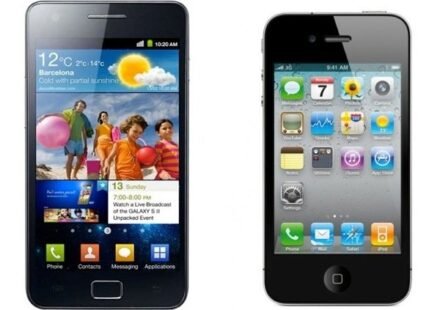
Samsung galaxy s 2 vs apple iphone 4

It was in July first week, that I started using the Samsung Galaxy S2. With my touchscreen smartphone background starting with Nokia 5800 in 2009, I’ve used iPhone 3GS, Nokia N8, iPhone 4 and the Samsung Galaxy S2 till date. Android has always excited me. However, issues like poor battery life, poor camera, poor performance on stock ROM etc stopped me from getting one.

When Samsung Galaxy S2 was announced during the Mobile World Congress, I was really excited. It sounded like “The Android Phone” I should get. But then again, touch whiz was a turn off. I have seen the touch whiz UI on the Samsung Galaxy S and I wasn’t a big fan of it. Months after the announcement when the phone was being shipped and the initial hands on videos started appearing on the internet, I started to like the TouchWhiz UI. After all it was a new version of TouchWhiz UI(version 4) that was shipped on the Samsung Galaxy S2. In addition to that, it had some exclusive features like Readers Hub, Social Hub, Music Hub etc.

The phone had everything I wanted. And I don’t have to describe the product here. Everybody who has little taste for tech knows the Samsung Galaxy S2. When I first got the device in hand I was blown away. The giant 4.3 inch screen was awesome. Everything looked so huge in it. For the past two years I was tied to 3.5 inch device and now a sudden leap to 4.3 inch really made me feel the difference. Although Im not a huge gamer, I do play simple games like Cut The Rope and Angry Birds and Oh Boy !! The experience was amazing. I also fired up the web browser quickly and logged to my favorite websites. It all felt really good. Music player with full album artwork and watching movies was outstanding. Since my sim card was cut in to micro sim, thanks to Apple’s odd choice on the iPhone 4, the very next day itself I took a new sim and I found myself using the Samsung Galaxy S2 as my primary device.

First few days I was showing off the device to my friends who aren’t very techies but were fascinated by the device. And yes there were one or two who didn’t realize that it wasn’t my iPhone 4 until I actually showed them closely. Thanks to Samsung’s innovative design team that borrows idea from Apple’s design team without permission Very soon the initial days of explaining friends and family about the new phone were over and it became the usual phone of my life.

I mainly use my phone for apps, email and internet browsing. I’m not a camera enthusiast and hence I don’t use camera much. But I gotta tell you that camera on Galaxy S2 is great and way better than what I expected. The biggest difference that I felt using the Galaxy S2 was the speed. It was incredibly fast. By incredibly fast, I really really mean it. Launching apps, switching apps or even clicking URL from twitter or Facebook launches the browser in no time. Even webpages were rendered very quickly. Gmail app on Android is simply amazing. And thanks to its Labels support, a huge amount of time I spent on email on computer sorting emails and labeling were reduced. So if it was all this great why did I make the switch ?? Let’s find out. Before I begin, I would like to make it clear that this is not a race to prove who is better than who ?!! In my honest opinion, both phones are heroes of their own world. Then if you ask why this post is written ?? Its just to let you know my thoughts and for those people who have the same taste as mine can get a better idea of how its going to be if they used either of this device. Now thats made clear, lets continue :)

Battery Life:

No matter how awesome a phone is, we all look for battery life when it comes to purchasing decision. Samsung Galaxy S2 has a 1650mAh battery which is pretty decent compared to the current market standard. I always use 3G on my phone. I’m twitter addict and hence I always tweet. I do check twitter app every one hour and posts replies and pictures very often. Similarly, I do browse the web a lot especially when on 3G and thanks to the 4.3 inch display its such a great experience. I’m not very addicted to FaceBook but I keep it open for some random checks during certain intervals. Other apps that run round the clock on my phone are Facebook messenger which I use a lot, Cut The Rope game which I play very often etc. I make very less phone calls and sends SMS rarely. With all these activities in a day, I manages to squeeze in 6-8 hours on 3G and around 10 hours on 2G. I believe thats a good battery life that the phone can deliver. Especially if I compare it to my iPhone 4s performance on 3G, Galaxy S2 is better.

But what completely annoyed me about the Galaxy S2′s battery is the time it takes to recharge. It takes a straight 2 hours and 30 minutes to fully charge itself from 0%. Sometimes even more if I use the phone a little bit while charging. I strongly believe its the micro USB port thats responsible for the slow charging mechanism, but it really creeps me out. I’m cool if my phone dies in middle of the day considering my usage pattern. And I always get out preparing for that. So I do carry my charger and portable charging device(Zagg Sparq 2.0) with me. But it takes forever to charge itself. I travel a lot and when my phone dies during the middle of the journey I connects it to portable charger. But the phone gets charged very less before I reach destination or before I continue to use it. So it dies again and I have to wait a lot to recharge again and get started all over again. Thats a serious pain in the (wherever it may concern). So this was a serious concern for me. I heard about a 2000mAh battery being released by Samsung for the Galaxy S2 which brought some hopes in me. But then again I never saw it coming to the market and even if it comes out, I will still be stuck with the slow charging micro USB port. If you’re not a power user, this phone lasts very long. Unfortunately, thats not my case.

iPhone 4 however quickly charges itself. In just about an hour it can charge to 80%. Even if you charge it by connecting to USB port of your computer it does charge very quickly. So if I get a 15 minutes of charge from a power outlet or USB I get enough charge to keep me going. However, in a 15 minutes of charge Galaxy S2 hardly survived 5 minutes. You can imagine how annoying it is when your phone dies while you are working on it.

Apps & Android Market

Being a blogger, I have reported about the Android market a lot and the number of apps that piles up every quarter or so. It was only after getting the Galaxy S2, I could experience them. As I said in the beginning, the 4.3 inch screen brought a new level of experience with the apps. Especially the Super AMOLED Plus display did its fair share of making apps looks great really well. However, the Android Market failed to impress me. Starting with the whole market menu structure. The UI was very boring and I couldn’t ask for a worse UI than that. It was very difficult to find new and exciting apps. If you were visiting the market with a particular app in mind, you could simply find it with a search. but if you wanted to find an app to nurture any particular need of yours, the chances of finding one was very low. And if you found one, it was hard to figure out if it was good or bad from the reviews as the reviews consisted of feedbacks from all the Android users with different phones. So if Mr.X says the app is buggy, he may be referring it to his Galaxy Ace. While Mr.Y who says its awesome may be referring it to his Galaxy S2. How could you find out the truth then ?? The only way was to download and find out yourself which is very very sad.

And if you download a few of the common and great apps like Facebook Messenger, Spotify, Google apps, Read it later and all those few good ones, then you’re almost done with apps. Rest of the apps are all just cra*. Many apps even reminded me of those early Java apps you use to find on basic phones. Please do keep in mind that all those apps you really want to use are out there and they are definitely good. But if you look for a lot of alternatives for the existing apps or if you want to simply try out something new, you may not find one often. During those times when I was really bored, the Android market didn’t have anything new to offer for me. This may not be what everybody does, but I always like to try out new apps when I’m free. The Apple App store has plenty of apps. You will also find a lot of cra** there, but the amount of great apps are just too much that you hardly come across the worst ones. And even if you came across one, the reviews are there to help you out. Apple takes reviews seriously. There are developers who simply gifts apps to users to get a good review. But on the App store you cannot write review if you have received an app as a gift. This is just one of the many measures Apple has taken to ensure that only the best is always served for you.

Coming to the UI of apps, some apps I mentioned above are really good. But most apps have very poor UI. They look dull, faded and some are even pixelated. And trust me, when you run those apps on 4.3 inch device with Super AMOLED Plus, you don’t wanna see what I saw !!! The screenshots above are some of the iPhone apps I use. These apps have been specifically designed to support Retina Display and make the best use of it to give users a great feel and experience.

Android Market gave me a feel that Google is targeting Quantity over Quality. Anyway, I would like to really appreciate Google for the new market. Even though its not yet available everywhere for all devices, phones like Nexus S has got it and if you have grabbed the set up file(apk) you would have experienced it too. I tried it and I have to tell you its good. It makes the entire market app itself beautiful and it also brings more apps from different categories into front page by featuring and sorting in several varieties of top lists. This has really increased our chances of finding new and noteworthy apps. Plus, now you can set a pin to avoid accidental app purchases which is nice. However, the app quality is still not up to the mark. Its getting better, but not fast enough.

Data Back Up & Security

I’m quite surprised to know that Google has not come up with a Back Up solution yet for their Android phones. How do you move your data from one phone to another when you make a switch. Although there are many 3rd party apps that does that, the best app that does the job well requires you to root the phone and should be purchased(full version) from the Android market. Yes, Android market shows apps that requires your phone to be rooted too(WTH !!). Google being the king of the web still haven’t come up with an online back up solution yet. With Apple prepping iCloud for launch its about time that Google starts working on one. Honestly, I expected Google to be the first though.

iTunes whether you like it or not is the best back up solution out there. It not only back ups the apps you own, but the application data as well. So everything you did within an app remains and is transferred to your next phone from where you can pick up doing things from where you left off. Now with iCloud introduction, you don’t have to rely on iTunes. You can back up everything on the web which is fantastic. So this means even if I lose my phone, everything I had in it can be retrieved in minutes. I really missed a back up solution on Galaxy S2. Even though Google+ app stored my photos and videos online and the all the apps from market were tied to Gmail ID, every other personal data were not backed up or protected.

Android is well know for malwares. I haven’t confronted any app that was affected by malware. but knowing that you and your data are vulnerable to any malware was quite frustrating. Besides, Google’s careless attitude didn’t give a good vibe either. I don’t want my credit card number, sms or any other personal data end on online or any other person. I hope Google takes immediate effective measures to address these issues.

Build Quality and Style

I never keep my phone in my pocket. I always like to hold it in my hands unless the situation demands otherwise. Galaxy S2 always felt very “BIG” in hands. Even though the bigger screen gives you a better experience, carrying it around was quite difficult. I tried my best to carry it around without taking it as a serious issue. But day by day, it got serious and I couldn’t ignore it. Fitting the phone inside shirt or jeans was difficult. On most of my outfits, Galaxy S2 remained peeking out of the pocket. Say your phone is in your pocket(jeans) and you need to take it out. If you’re sitting, there’s no way other than standing up and taking it out. Now put this situation in to a crowded bus or metro, there’s no way you can take it out easily. In some shirts, the phone didn’t fit on the pocket well. A part of the phone was outside the pocket. That also gave me a feeling that it may fall down quickly even though it didn’t. Using this phone made me realize that a 4 inch device is the perfect size for a touchscreen phone. Its not too big and not too small.

Apart from the size, build quality was a concern. Samsung is famous for its plastic phones. It just felt so cheap in hands. We pay a huge amount of money for these high end smartphones and yet you don’t get the feel of a premium device from the phone. iPhone 4 on the other hand gives you a better feel in hands. However, its not a strong phone. If you drop the phone from your hands chances are very high that you may damage it seriously. Galaxy S2 isn’t that vulnerable to damages. And finally, your phones is style statement. People do judge you by your phone. Even though most of us don’t agree to it, its a fact. Its a style statement and I don’t think Samsung does a good job at adding it to your style. If you see someone with a Samsung phone and an iPhone you know what you think about them. No, don’t say it :)

Accessories

A great phone isn’t everything. Most of us love to spice it up with a few accessories to get the best out of it. Accessories aren’t just about headphones and cases anymore. This whole category of products have gone wild. Today you can do almost anything with it like turn off your lights at home, unlock your car or just about anything. I don’t use any of these features yet. But I do like to buy cases, speaker docks, headphones, FM transmitters, docks and other cables that just maximize the power and features of the iPhone. Some or most of these may be available for the Galaxy S2 but the amount of choices you have cannot be matched. Not today, not tomorrow or any day from now in the future.

Resale Value

A new smartphone with tempting features come out every now and then. If you are a gadget fan, its hard to resist your urge to buy it. But what will you do with your old phone ?? I prefer to sell it. And hence while making a purchase I do consider the resale value. Lets take the case of my iPhone 3GS. I bought the phone for Rs 31000 ($673 approx). A year later I sold the phone for Rs 21000 ($450 approx) with dock. There many reasons for this. One being that Apple always releases new iPhone 8-10 months later in the Indian market. That means the grey market iPhones rule till then and they are way overpriced. I don’t think I would ever buy a Samsung phone for that price. Besides, in one year span either Samsung or other players will roll out plenty of Android phones that would make their current phone a thing of past and very outdated. But with iPhone, you are guaranteed that nothing will top it for a one years time which maintains its market value. And iPhone’s price always remain the same. Galaxy S2 was priced around Rs 32000 ($695 approx) when I got it. Now within a span of two months you can get the same for Rs 28000($600). The price keeps falling month after month. I can’t even imagine what the price would be a year from now and how much one would pay for a second hand device.

Those are my biggest concerns/issues with Android. And hence I have decided to stick with my iPhone 4. Some or all of these issues may concern you and I hope this post has helped you to understand it better. Once again I repeat this is not a post to tell who is a winner. I love both phones. Unfortunately, at the moment its the iPhone that fits my needs. That said my next post shall be on “Why I Want My Beloved Galaxy S2 Back” which will detail some of the features that I just can’t bear to miss. The title shall be hyperlinked as soon as the post goes live. Meanwhile you may share your views under the comments section below. You may also let me know if any of these issues have a fix or not. My experience with Android was after all just two months.

eBay India Releases Their iPhone App: We Went Shopping[Video]

eBay app for iOS has been there for a while now. However, in a recent update, they have added support for a few more countries including India. From now on, users can search, watch, bid or even buy items from the largest collection of commercial products from them. In the video, we have demoed buying a small product just to give you an idea of the entire process. Hope you enjoy it 🙂

Facebook For Android Updated To Version 1.7: Becomes More Social & Private

I wasn’t really a big fan of Facebook for Android for that it was a lot buggy, feature less and not very pretty. However, today the app has received a new update that has fixed a lot of concerns I had with the app. The app now features Pull Down To Refresh which is […]

Excerpt only. No capture of this post’s full text survives in the Internet Archive; what appears above is the teaser its index page carried. Check every archived capture of this URL.

New Update For Facebook Messenger Is Out

The recently released Facebook messenger for iPhone got updated to version 1.0.1 today. The new update brings More accurate location mapping, Faster image loading, Faster launch time and many bug fixes.

To download the app or the update, Click Here

Related posts:

  1. Facebook For iPhone Updated To Version 3.4.4 The last update of Facebook was rolled out on June…
  2. App Store Update Page On Your iOS Device Now Shows Update Release Date Too this might not be the biggest of all the changes…
  3. Google+ Android App Update: No Word About The iPhone Client Yet Google’s latest social networking website’s Android app has just received…

Related posts brought to you by Yet Another Related Posts Plugin.

Nimbuzz For Android Brings Push Notifications

And finally push notifications are here. Nimbuzz just updated their client for Android devices and has brought two new cool features. All devices running Android 2.2 or higher can now enjoy push notifications along with message delivery notifications(will work on all versions). Message delivery notifications is a feature previously seen on apps like […]

Excerpt only. No capture of this post’s full text survives in the Internet Archive; what appears above is the teaser its index page carried. Check every archived capture of this URL.

Video: iOS 5 iMessages

iMessage was one of the surprises that this WWDC brought to us. Although we were just expecting a new notification system, some widget support and few other changes, iOS 5 bought just more than that. So what is iMessages ?? iMessage is no new app. It resides with in you Messages app and shows up all messages exchanged with a user within the app itself. Meaning, your entire conversation with a user is right there in one page whether it is an sms, mms or iM (iMessage). iMessages uses phone number or registered Apple id to communicate with each other. The moment you select a contact and start typing the messages, iMessages quickly checks if the receiver is an iOS user with iOS 5 installed. If yes, the message will be sent via iMessages service via internet without any extra charges.

Now how do one understand which of those sent messages are iMessages and which others are SMS/MMS ?? iMessages uses blue bubble while SMS/MMS uses the default green bubble. So if your friend does not internet, then the message is sent as SMS and you are warned of any applicable charges before its sent. iMessages also support delivery reports and read receipts. So now you can know when a message is delivered and when its read. Oops !! A lot has been said already. Check out the video to see it in action. And don’t forget to subscribe to us YouTube for more videos. Click here to Subscribe