Twitter Brings Photo Filters To Its iOS & Android As Instagram Withdraws Twitter Cards Support

Some of you might be heartbroken to know that all your vintage photos taken via Instagram will no longer show up as a thumbnail on the twitter feeds of your friends. Instagram recently announced that they are withdrawing the Twitter card support as they intend to increase the user activity on Instagram web. Instagram web profile was rolled out to users a few weeks back. As of now, photos continue to show up on third party clients while the official ones fails to show a thumbnail. 

Call it a coincidence or a planned revenge, Twitter rolled out inbuilt photo filters to its official clients on both Android and iOS earlier today. Users can now add filters to their photos before they are shared on Twitter. I guess many users will now use Instagram a little less than before. 

The app brings eight filters to choose from. There’s also an auto enhance option available to quickly fix and enhance your picture. And you can also crop and pinch to zoom as well while editing.

The app is already live on AppStore and PlayStore

Buy iPhone 3GS From Aircel For Just Rs 9,999/-

In a bold attempt, Aircel has decided to bring down the price of iPhone 3GS to Rs 9,999/- if you are willing to pay Rs 3000/- more in addition to Rs 9,999/- price tag. The extra amount you pay qualifies you to enjoy their 2GB 3G unlimited(Speed will be stripped down to 128kbps after 2GB) internet for 12 months if you’re in their 3G circle or 1000 minutes of local and STD calls, 2500 local and national SMS and unlimited 2G internet connectivity for 6 months if you’re in their 2G circle. The offer is limited to postpaid customers. But this is an offer worth signing up for. 

Apple released iPhone 3GS in 2009 and it still continues to be in the market. iOS 5 brought features like iMessage to the 3GS keeping it in the game and now iOS 6 is about to add a host of new features to it when it will be released this fall. iPhone 3GS currently runs iOS 5, it has 3.5″ screen like any other iPhone, a 3.2MP camera with no flash, 3G connectivity, WiFi, Bluetooth, GPS, Compass etc.

iPhone 3GS have been retailing in the market for Rs 19,990/- so far and it didn’t sound like a good buy considering the Android alternatives at the same price range. But now, in its new price segment, it is definitely the best option you have. Click Here to know more.

Skype For Windows Phone Released

Skype is finally available for Windows Phone. It’s a bit surprising to see that even after Microsoft acquired it took so long to arrive. However, better late than never. The app supports a voice and video calling. Sorry Symbian users, I don’t think voice and video will come to Symbian anytime soon. The app’s metro UI looks really good. Other features include:

  • Portrait mode video calling
  • Support in 18 languages
  • Add new contacts (Skype and phone contacts)
  • Support for participating on audio conference calls
  • Call-in-progress notification
  • Ability to mark all messages as read
  • Block/unblock/view blocked contacts

To download the app, Click Here.

MakeMyTrip Launches Android App

Screenshot 2012 04 19 1155

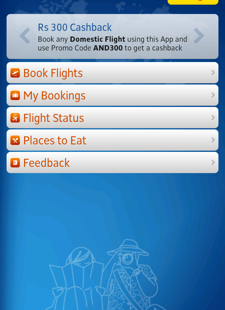
Famous Indian travel site MakeMyTrip.com has launched their new Android app recently making it easier to book flight tickets from your Android phone. Previously, people had to rely on their mobile site to make reservations, however this new app makes it easier to book tickets directly. You can book one way trip or return trips just like you used to on their website. We are soon hoping to see railway and bus bookings to be included in the app through future updates. The app will also notify you of great travel deals when available and users can grab them instantly.

Screenshot 2012 04 19 1156 1

The app is available for free and requires Android 2.2 or higher to run. To download the app, scan the QR code below or Click Here.

MakeMyTripApp

Facebook For Android Updated: Brings Timeline, Real Time Notifications & More

Facebook app on Android has received a new update bringing some major improvements to the app including the timeline support which was so far available only on Facebook website and the iPhone app. From now on, Android users can enjoy the timeline view on their mobiles as well if the user has it activated in their account. In addition to this, Facebook has also added the real time push notifications to alert you of any notifications from your account instantly. Navigation to groups, apps, pages and settings has been made easy with a single tap access. You can also see tags on pictures and enjoy the new picture viewer. Games and apps are also now accessible on mobile. So now you can continue to play your favorite Facebook games from your phone as well. I wasn’t a big fan of Facebook app on Android initially. But with the last few updates, the app has become really smart and useful. If you haven’t used it yet or haven’t updated to the latest version, then scan QR code below or Click Here to download it.

Want Facebook Messenger On Mac ? Here’s How To Get It

We just saw the launch of Facebook Messenger for Windows, but there’s no word on a Mac client. Did you know that you can chat with your Facebook friends using iChat on Mac ? And if your opt to save your chats in the preferences, you get the same experience of using the Facebook Messenger with chat history. Here’s how:

1. Go to the iChat menu and select “Preferences”.Click “Accounts”, then click the “+” at the bottom.

2. Select “Jabber” from the pull-down menu, then enter the following info:Screen name: username@chat.facebook.com

3. Password: <your Facebook password>

4. Click the arrow next to “Server options” and enter the following info:Server: chat.facebook.com

5. Port: 5222

6. (Untick the box labelled “Use SSL”)

And you’re done. Now you can chat with your Facebook friends without the need for a separate app.

Facebook Messenger For Windows Now Available

Facebook is becoming an inevitable part of our life. Atleast for most of you out there. We have loads of apps to access Facebook on the go. However, Facebook always lacked a desktop messenger app to send and receive messages with friends. And lets be honest here, the Facebook messenger on the Facebook page is terrible. Well, here’s some good news. The social networking giant has released a new messenger application for those of you who run the latest Windows 7 on your computer. Thats right, you outdated Vista and XP users won’t get any Facebook messenger love unless you upgrade, at least for now.

To download the app, Click Here.

The app doesn’t support video calling at the moment, but its an upgrade you can expect in the future. The app notifies you of any notifications that happen in your account. The app demands a browser sign in the very first time as it lacks a login screen of its own. So what are you waiting for ? Go get it now.

Spotify App Now Available For Windows Phone

Popular music store Spotify has just launched their mobile app for Windows Phone. The new app is their seventh app for a mobile device and that makes them the only music service with so many apps for different platforms. Spotify is limited to a very few countries, but with  a Spotify premium account you can enjoy the service literally anywhere in the world.

Now we all know that Windows Phone already has Zune, but then again if you use multiple devices across different platforms, then Spotify would be your best choice. Not to forget, Zune is not available in all the countries. The new Spotify has the following features:

  • Search, browse & play our catalogue of millions of tracks
  • Explore & play your friends’ playlists, top artists and tracks
  • Stream over WiFi or 2.5/3G – all your existing playlists are available
  • Offline playlists – play your music without an internet connection
  • On-the-fly sync – every track you add to a playlist appears on mobile and computer
  • What’s New view
  • Receive music from friends via the inbox
  • Starred tracks – tag all your favourites into a special list

Exciting, isn’t it ?? Head to the Marketplace to download the app.

Tune In Radio Gets A Major Update: New Icon, iOS Twitter Share and More

The popular online radio application Tune In Radio has received a major update today. The new update bring a all new icon along with many other improvements including the iOS 5 twitter share support which is great.

• iOS 5 Twitter support
• Now playing info now shown on lock screen and multitasking controls on iOS 5
• Added the ability to donate to listener-supported stations
• Speaker icon next to volume slider now mutes audio
• Added brightness slider to clock display (requires iOS 5)
• Advanced settings now show descriptions for some settings
• Added support for additional podcast formats
• Get help link in Report a problem now shows FAQ
• Bug fixes

Click here to download the “Paid” version.

Click here to download the “Free” version.