Fring For Android Gets An Update: Brings 4 Way Group Video Calling

Fring continues to revolutionize the way we actually connect with each other. Fring updated their iPhone client with group video calls last month and today they have updated their Android clients to support 4 way video calls. Here are the new features the app brings to the Android platform: Make free Group Video calls […]

Excerpt only. No capture of this post’s full text survives in the Internet Archive; what appears above is the teaser its index page carried. Check every archived capture of this URL.

AppScoop: Blog With iBlogger Video Review

These days every one of us have a blog or website. And our life has gotten busy that we actually don’t get enough time to sit and peacefully blog. And hence the need for blogging apps on the go are tremendously increasing. We have a lot of apps on the iOS platform, but when it comes to blogging apps you won’t find many good ones.

We took a run through the app store and we found two apps that caught our interest. One was the basic official wordpress app and the other iBlogger App. So we went ahead and reviewed the iBlogger app. Check out the app in action. Also feel free to subscribe by clicking on the YouTube TV placed at the right hand side of the page 🙂

Molome: The Instagram For Nokia

Nokia phones being one of the best camera phones in the market seriously lacked some photo apps. Apart from simply snapping photos and doing some nursery level editing from native editing app, there wasn’t any decent app for Nokia for photo effects. Apps like Instagram, colorsplash has been rocking on millions of iOS devices while Nokia thirsted for one decent app. And today, we came across this simple and easy to use app called Molome(QT Based) in the Ovi store.

Just open the application, and you’ll be shown all the photos you’ve taken so far. You will also see the pictures of people who you are following. You can open each picture and “Love it” which is similar to “Like” in Facebook. You also have the option to leave comment on the pictures. At the bottom of the app you’ll see option to browse through popular pictures on Molome.

Upon tapping the Share option, you camera is loaded and you are ready to snap. You are provided with options to take a snap in automatic settings or you can drag the slider on top right to snap in Macro mode. Honestly, we found no difference in the pictures taken in both modes. You also have the option to turn on/off the Flash or even set it to Auto mode.

Once you tap the Take Photo option you are taken to the next page with a preview of the snap with all the funky effects at the bottom. You can tap on each effect and see the instant preview. There are 18 effects to choose from at the moment. And hopefully we should see more in the upcoming updates.

Once you’ve decided on the effect, hit next and give it a suitable title of your choice. You can post the picture to Twitter Or Facebook. The picture goes into molo.me website. A link to the picture will appear on the twitter account.

PS: When you try to configure Twitter, you may get a “Failed” message. Simply quit the app and open it again and you’ll see your account added. It’s a little bug in the app and will be corrected in the next version mostly.

The app also shows an option called “Notification”. But as you can see, we will see something there only in the next version of the app.

And finally you have “Profiles” option where you can see your profile, number of photos, followers etc. You also have option to search for users, edit profile or sign out of the service.

All in all, this is a great app. We are very happy to see so much stuff in this app considering the fact that its at version 1.0 Beta. This was one of the most wanted app for the Symbian platform. And now you can do a lot more with those 12MP camera phones. Can’t wait to try ?? Then click here. It’s free as well !!!

Exclusive: iPhone 4 To Be Launched Via BSNL

Today we spoke to an officer from BSNL Head Office who was discussing the BSNL’s roadmap for this year. We asked him about the iPad plans and he said BSNL has been in talks with Apple for months on these plans which they introduced yesterday.

And he added that iPhone 4 will soon be introduced with BSNL in not less than a month’s time. The talks are really showing a positive sign, he added. But it’s not Final yet. When asked about data plans, he said what applies for iPad, applies for iPhone 4 too.

When asked if the iPhones will be locked with contract, he said, “Can’t Comment Now”.

With massive success of BSNL in 3G and the experience of service they have over others, its very likely that they get the deal from Apple. Now that they have introduced iPad data plans even before iPad launched officially, it makes sense to believe that BSNL has some insight to Apple’s work plan in India.

Isn’t this really great news ? We know how long it took for iPhone 3GS to come to India. Not to mention, the poor pricing and plans from Airtel/Vodafone really ruined it. With BSNL we see some good times ahead.

Are You Excited As We Are ?

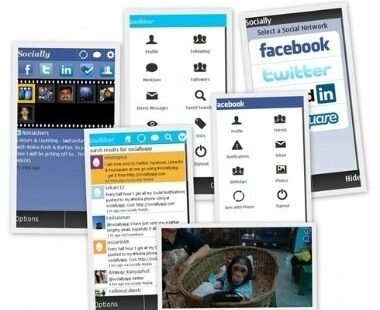
Socially App For Symbian Updated V3.0 (beta)

Socially app for symbian has been upgraded to version 3.0 which is a beta release today. This new version is a major release bring more features. You may read the change-log below.

  • completely new and rewritten engine to deliver faster performance
  • removing the many UE quirks that have been confusing and frustrating our users
  • building optimized user experience separately for v3 and v5 handsets
  • improved Social Notifications – 5mins refresh & customization by social network

Click Here to download the app or go to http://m.sociallyapp.com/beta

AppScoop: 100 Pushups For iPhone/iPod Touch/iPad

Here is our first app review video show AppScoop. Today we are reviewing the 100 pushups app. The idea of this app is to train you to do 100 consecutive pushups through 6 weeks of training. Find More about the app in the video.

Click Here To Download The App

No related posts.

Related posts brought to you by Yet Another Related Posts Plugin.

iOS App Update: 1password, Tango And Cut The Rope

Hey all. We’ve been little busy these days and we are sorry for not posting anything these days. Well, we’re back and what better way to be on track, we have some great app update information for you. To start with, 1Password 1password is one of the most popular security apps for the iOS. […]

Excerpt only. No capture of this post’s full text survives in the Internet Archive; what appears above is the teaser its index page carried. Check every archived capture of this URL.

Nimbuzz 3.0 Arrives For Symbian^3 Devices

Nimbuzz needs no introduction. If you are a smartphone user then you probably might have used this app. Nimbuzz is one of the best IM and low cost calling app. The new version 3.0 brings a lot of features to give you a great chatting experience. Here are the useful new features you will […]

Excerpt only. No capture of this post’s full text survives in the Internet Archive; what appears above is the teaser its index page carried. Check every archived capture of this URL.

WINAMP For Android Arrives In Beta

Its time to take a stroll down your memory lane and brush up all those good memories about listening music in your favorite Winamp music player. If you’ve been missing those moments on the go, then its your day if you are on the Android platform(Android 2.1 OS and above). It not only brings […]

Excerpt only. No capture of this post’s full text survives in the Internet Archive; what appears above is the teaser its index page carried. Check every archived capture of this URL.