
Sony Xperia U Review

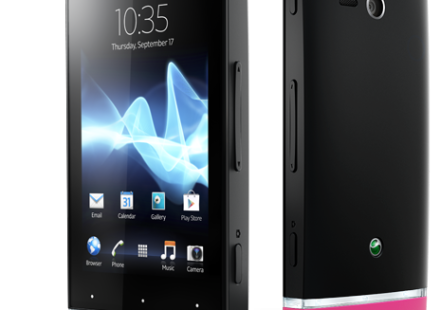
Xperia u black 464x533

Sony hasn’t been quite active with their Android smartphone portfolio lately until they announced the Sony NXT series. This new series comes with a handful of Android phones that is targeted at all budgets. So there’s one device for every segment. The Sony Xperia U is the cheapest of the all. Other models include Xperia Sola, Xperia P and the Xperia S. We’ll be covering all the reviews here starting with Xperia U today.

Hardware:

Xperia

The Sony Xperia U comes with a 3.5inch LED backlit display with a resolution of 480×854 pixels. The screen has approximately 280 ppi which is a lot more than many Android phones out there in the same segment. The display is also powered by the Sony Bravia Engine which will make your pictures look really good in the display. We really enjoyed the quality of images on the display. The color depth in the image was very impressive. The 3.5 inch display may turn some buyers off from this phone. Today, everybody is running behind large screens which are even difficult to carry when you consider certain models. If you are not crazy about phones with large displays, you’ll find this phone as one of the best. The phones size perfectly fits in hands. When you hold it, you know you have a good grip and control over it that can avoid accidental slippery leading to disasters.
SidesII
On the right side of the phone, you’ll see the power button, single piece volume rokr button and the dedicated camera key. The three buttons are equally placed away from each other. Some you may find the volume rokr a bit to hard to control as its at the centre of the phone. But once you get the hang of it, its no longer a problem. The inclusion of a dedicated camera button is well appreciated. Let’s face it, having to fire up the display and then launch the camera app is tiresome and may also be the reason why you miss some great shots. However, the designers at Sony seems to have addressed the issue. And they’ve also included a special feature called the Quick Launch Mode where in which you can quickly target the camera to the object even when the display is off and perform a long press on the camera dedicated camera button and the camera app launches instantly and auto snaps whatever is in the frame. So, there’s no more excuse to missing that special moment again. I found this feature pretty useful.
Sides
On the left side close to the top, you’ll notice the the micro USB port for charging and data transfer. That aside there’s nothing else on the left side. At the bottom you can see the strap hole if you intend to use a hand strap and then there’s the main microphone as well. Sony does not provide any hand straps in the box, so you may have to buy them separately. On top we have the 3.5mm headphone jack to connect the headphones that comes in the box or any other standard headphones available in the market. You will also find a second microphone on top along with the headphone jack.

Glasscut

The new Xperia phones have an eye catching design. The inclusion of a transparent glass between the body close to the bottom not only make it look gorgeous but also increases the antenna performance. And if you really look closely, you can see the default Android action keys like the Home, Back and the Menu icons there. Right above them the three white dots can be see which is where you should tap so that the intended function is performed. And the most amazing thing is this glass cut piece gloss in different colors. It glows with a certain colour when you get a call. It glows when you press the action keys and it adjusts the color of the light to whatever colour is dominating the display. So if you are watching the picture of a green forest, it turns green, red for strawberries or whatever colour is being displayed on the screen. Its interesting to see how much Sony has concentrated on bringing a great design. While most manufacturers try to pack high specifications over great design, Sony has taken a different step this time. They’ve given equal importance to everything.
Camera
Sony has included an 5MP camera with LED flash on to the phone. The phone takes very good pictures once you try a hand with the exposure levels. Photos looked a bit washed out without adjusting the exposure levels. However, the video wasn’t very impressive at all. It takes 720p video and the quality of it is quite underwhelming. There’s also a front facing camera which is VGA for self portraits and video calling. Watch the samples from the back camera we’ve posted below.

[nggallery id=16]
CaseBatteryPhone

On the Inside, Xperia U sports a dual core 1Ghz A9 cortex processor with 512MB RAM. And we’ve gotta say it, the processor and RAM does their job quite well. We never really experienced any lag on the phone. Everything was quite smooth from launching apps to playing games. The phone currently runs Android 2.3(Gingerbread), however a planned upgrade in third quarter this year will bring Ice Cream Sandwich to the device. Currently, only Xperia S has got the Android 4.0 update. The only downside of the phone that we couldn’t put up was the storage. Sony, for some reason has only added a 4GB ROM into it with no external card support. Thats right, if you listen to lot of music or if you watch a lot of movies, then you’re gonna find this storage very insufficient. Not to forget, all the photos you take, videos you shoot and the apps install also go to the same space. If its any compliment, the phone supports USB OTG i.e. USB On The Go. So you can have your contents loaded from a pendrive which can’t stored on the hard drive. Coming to connectivities, the phone is equipped with WiFi b/g/n with DLNA support. You’ll also find Bluetooth support, GPS, FM Radio etc. The phones bottom cap is interchangeable. You can put white, Pink, Blue or Yellow caps. Xperia U has a 1320mAh battery to support all your activities on the phone. While this may not sound very pleasing to many heavy users out there, taking into account the size of the display, I think this is pretty neat. The phone didn’t last for an entire day(which phone does ?!!), but it got us going till the evening on 3G which is not bad. Not to mention, we were on 3G network, switched to WiFi for a few hours, push was enabled for email and twitter. The best part is, these device charges very quickly. If you use the supplied power plug and the data cable, it charges pretty quickly. Most phones usually takes hours to charge via the microUSB connecter. But Sony has addressed that issue with the new line of Xperias including the Xperia U.
Software:
Sony has also worked a lot on the software side. Besides just loading the Gingerbread on to the phone, they’ve also added an overlying software called the Timescape UI. If you’ve used Sony Ericsson Android phones  before, then you might be familiar with this UI. To be honest, I found this software to be way better and intuitive than any other overlying softwares from the competing manufacturers. The Touchwhiz UI from Samsung packs a lot of features, however the overall look and feel of the software is really underwhelming. And when such a poor looking software is powered by a hardware as good as an AMOLED screen, you really get an awful experience. But Sony has done a great job here. They’ve beautifully designed the Timescape UI. The software has a grey theme everywhere. The icons look good. The transitions are neat and the level of access for menus are well placed that it doesn’t take a lot of steps to get things done. Sony has also integrated all the social networks in to this software to give you a unified experience. So every contact of yours will not only fetch you their phone numbers or email, but their social networking statuses from various sites which you’ve linked.
There’s also a dedicated app called the Timescape which  is one stop place for accessing all our social content like Twitter, Facebook, Foursquare etc. It pulls all the updates from all these networks and shows them in one place in a stacked UI. In landscape orientation, they beautifully re-orients to form a cover flow like UI. Other apps inlcude Back Up and Restore app that creates back up of the phone contents to restore later at any case of data loss and wipe off. Sony also has a software, something I would like to describe as an intelligent software that can act according to certain situations if preset. For example, you can assign it to run the music player when you connect the earphones. Or you can set it to run the Back Up and Restore app when you connect it to a charger etc.  The app is called LiveWare manager and works flawlessly. Sony also has included the Track ID app that works pretty similar to Shazam or Soundhound. The app can listen to music and then fetch you the song details in seconds. It also provides link to the purchase the song online which is cool. Talking about music, if you fall in to any supported countries of Sony’s Music and Video unlimited service, then you can enjoy great collection of song and videos right on your phone.

So to sum it up, Sony has provided a gorgeous looking new design powered with a good hardware, the amazing Android OS Gingerbread with a planned upgrade to ICS in the next quarter and of course with a lot of Sony exclusive apps and services. The phone feels great in hands, its not too big not too small and it lasts decently long enough. The exchangeable bottom caps are a plus for those fashion minded youths and the glowing glass piece is an eye turner. The Xperia U stands out as a classy device at its segment. If the limited storage doesn’t bother you much, then this is the perfect device at this price range. Its trendy, its handy and value for money. That said Sony Xperia U now retails in the market for around Rs 16,000/-. Online dealers like Flipkart and eBay have various offers going on at the moment which will let you buy the device even at lower price point. If you cant wait any longer, you can always walk up to Sony dealers close to your place.