It all started with RIM being rebranded as Blackberry. That’s right. The Blackberry maker will now be known as Blackberry and not RIM. The rebranding was announced during the Blackberry 10 launch on January 30th. It hasn’t been a good time for Blackberry in the market so far. They were kind of having a Nokia situation. You know, being the uncool kid in town. As iPhone and Android sales surged due to apps, variety of phones etc, Blackberry boys felt the heat than anyone else and had to switch.
Blackberry was quick enough to understand their mistakes and immediately made plans for a better OS that would live up to the demands of today’s users. And that’s Blackberry 10. Blackberry is undoubtedly famous for their email and instant messaging service. It has been attracting youths and corporates a lot. So how would an iPhone like device with Blackberry services and decent amounts of apps at start do ? Well, the answer is Blackberry Z10.
I was really excited to try the Blackberry Z10 mostly because I’ve never been a Blackberry fan myself and always hated the dated UI on its phones. However, I was quite intrigued when I saw the Blackberry 10 OS. It had everything Blackberry has been missing out so far. And it did feel like a worthy OS that needs our attention. The best thing what I like about Blackberry is that, instead of abandoning the platform, they actually went back to their desks and made a much better version of the OS showing what it’s capable of. This not only makes it appealing to new customers but also existing customers who are using the previous versions of Blackberry OS. Or else, the existing users would feel abandoned and cheated. Here in Dubai, the sales have been astounding. From day one, I started seeing Arabs and a few others walking around with Z10. That really surprised me.
Design:
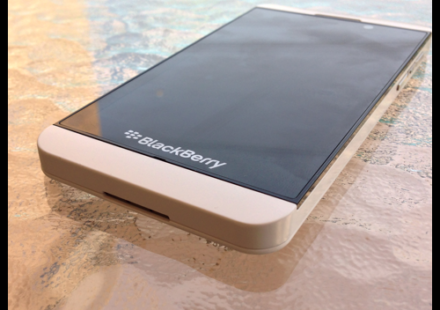
The Blackberry Z10 comes with a very appealing design. We’ve got the white here for review and I gotta say it, its one good looking device. At 137.5g, the phone is neither too light nor too heavy. And the 4.2 inch screen doesn’t make the phone any harder to hold and use with one hand. The phone is fully touch based and has no buttons on the front. Not even a home button as seen on the rival phones. The OS is all gesture based and it works flawlessly. The front of the phone is mostly the 4.2 inch screen with Blackberry inscription at the bottom of the screen. On the top you’ll find the ear piece, front facing camera and the proximity sensor.
The left side of the phone has the ports for MicroUSB cable and Micro HDMI cable. The top of the phone has a power button placed right in the middle, 3.5mm headphone jack and a microphone for noise cancellation. On the right you can see three buttons. Two of which serves the purpose of volume adjustments while the third positioned between the volume rockrs acts a play/pause button.
The bottom of the phone is plain with no ports but just a microphone and the speakers. On the rear, you’ll find the 8MP camera with LED flash and the Blackberry logo. The back case of the phone is removable unlike most of the smartphones in the market today. The case is very thin. In fact, it reminded me of the rear case seen on the Galaxy SII which is so thin that you fear you may break it while removing it. The case also has a rugged back so you can boldly keep it on it surface without fearing marks or visible scratches on it.
The back case opens up to reveal the battery which obviously is removable, the sim card slot which by the way is micro sim card slot and the microSD card slot that can read cards upto 32GB. I wouldn’t say the phone feels completely premium in hands. But its nothing short of being a decent phone. Perhaps its the plastic casing that kills some of its premium feel, but it does no injustice to the look of the phone. The phone looks classy and is appealing.
Software:
Blackberry Z10 is loaded with latest Blackberry OS iteration called Blackberry 10. Its a really refreshing experience in a world where you’re stuck with iOS, Android and Windows Phone. And the best part is, even the existing Blackberry users find the Blackberry 10 as a completely new experience. And that’s a good thing. Blackberry 10 has some amazing set of new features like the Blackberry Hub and the peak which are two of my favourite features. If you’re a smartphone user, you would know how many times you pull down that notification centre in just 5 minutes to see whats happening with your social networks. Now think of notification center which is always there just a swipe away. So what makes it special ? The interesting thing is that it does not just cover up your entire screen to show whats happening. Instead it just puts up these tiny little icons to let you know if somethings new. So if you see a twitter bird, you know that there’s a new twitter activity, similarly Facebook logo denote Facebook activity or the phone icon denotes a missed call and so on.
Now if you really decide to see what that is, you just have to completely swipe to the right from left to unveil the hub which includes all the notifications from all the apps on the phone. Your phone calls including missed, received and dialled, your text messages, your emails, your Twitter, Facebook, LinkedIn, Foursquare etc are all there in just one place. A further swipe from left to right reveals a quick access menu where you can choose to individually view the notifications from a particular app. For e.g. you can choose to see just the phone calls, BBMs, Facebook notifications, Twitter, LinkedIn or in short every group of notifications that makes its way to the Notification hub. Tapping on each notification takes us to the corresponding app so that you can act on it. You can also individually delete any notifications that you don’t want to be on the hub.
We already have notification centre on iOS and Android. But everything there lasts only for a while unless you either check that pending event on the notification centre or clear manually to get more space in there or to have even more important things to take the top position for immediate attention. Whereas on the Hub, you have a completely dedicated pull out notification window that can accommodate everything in a single group rather than sorting it app by app.
The overall Blackberry 10 OS structure is similar to iOS and Android where in which you swipe through apps. You get a 4 apps a row layout spread as in four columns. At the bottom, you can see the Phone icon, Search lens and the Camera icon. These three apps stay docked when you swipe though different apps list. Again, similar to what you’ve seen on iOS. However, Blackberry 10 takes a different direction with the multitasking interface. The open apps are shown as live windows that gives you a preview of the app page. A swipe that begins from the bottom of the screen towards up reveals the apps running in the background. In a single view you get to see upto four background apps in the window. If you scroll up from the there you can see more apps that are running in the background. Each window also has an immediate close button to quit it immediately if required. Tapping on any of these windows zooms you in to the app making the task of app switching a breeze. Once you get the hang of it, you’ll really start loving switching apps, peeking for notifications or jumping right into the Blackberry hub. It definitely saves a lot of time as you don’t have to take your hands off the screen to access any hard buttons.
And everything works just smooth. I would really put it next to or in par with iOS. Surprisingly everything is just so smooth and lag free. And I always felt I was using iOS on a different hardware. It was that smooth and a lot better in many situations. The developers have really thought this through before they started developing Blackberry 10. It acknowledges almost all the disappointments you have while using a touch based OS like the multitasking enabler where you always have to rely on a hardware button which interrupts your workflow, a full on notification centre rather than a temporary space that clears up with time or usage. And the multitasking app thumbnails than the app icons in the multitasking interface reminds you what exactly you were doing in an app before you switched which helps you a lot to prevent digital distraction. Come on, we’ve all been there. Everyday.
The Appstore known as the Blackberry world is not at its finest hour. However, one can’t deny that they’ve started of pretty well. You’ll see some familiar icons there like Angry birds, Asphalt racing game, Foursquare, Twitter, Facebook etc. And apps like Whatsapp, Instagram and Skype are about to launch or some of these may have already launched by the time you read this. The layout of Appstore is also well thought. You can quickly jump through categories and featured sections. Weirdly, the store does not ask you to enter your password while downloading apps or updating them. The initial sign in that you do when you set up your Blackberry qualifies as a license to every app including BBM. I would definitely want Appstore to ask for confirmation by entering password at least when an app is downloaded for the first time. Looks like people at Blackberry didn’t think so. The app updates page is also little far to reach. Its buried under the hidden options that’s only revealed when you perform a swipe from left to right. Its strange that they just didn’t bother to place that next to the categories tab when there’s so much room left in there.
As you would expect, each apps also have a reviews page that you can look at. The Appstore also loads very fast and works without any hiccups. In supported countries, mostly European countries can purchase and download songs, videos and ringtones. However, UAE is not one of the supported countries and hence I couldn’t check them out.
Camera:
The Blackberry Z10 comes with an 8MP camera on the back with LED flash. And a 1.3MP front facing camera for video calls and self portraits. The camera was never a biggest selling point of Blackberry so far. And it doesn’t seem to have changed much. In my test, the 8Mp camera did some decent shots. The performance was not a let down, but that didn’t cheer me up either. However, under extreme sunlight, it did deliver some great results. But under lowlight ?? Not so much. Macro photography was good. Videos again were decent. The phone shoots videos at 720p by default. But if you dive into the settings, you can change it to 1080p. Let the samples talk for themselves. Check out the gallery below.
[nggallery id=21]
But the exciting feature of the camera is the Tilt shift feature which comes very handy when you take a picture of a group of people or playing baby. its always hard to get the best shot where everyone’s paying attention or giving a smile than a funny face. But Tilt-shift just lets you get the best shot as it takes multiple shots at a time.
The Blackberry World already has a couple of picture editing apps that will let you further enhance the pictures and videos you shoot. And not to forget, Instagram for Blackberry 10 is on the way.
Battery:
Blackberry Z10 lasted decent through our tests. I had to charge only every 1.5 days with data and 3G off and all activities limited to WiFi. But on a 3G connection, we found it to last till the evening after a full charge. Even after watching a video or playing a game, the drop in battery percentage was comparatively less than that of other contenders in the same segment. However, the only turn off was that you can’t tell the battery level exactly as it doesn’t show you battery percentage. Come on, Blackberry this is 2013.
The battery on the Blackberry Z10 is removable and has a capacity of 1800mAh. That seems a tad less compared to 2000mAh+ standard that we see today. So if battery life is one of your biggest priorities, you may want to think again. But mind you, battery life could get batter with more software updates that bring more optimisations to the software. Blackberry seems to be really hard at work. We’ve seen two round of updates already. So, things can only get better. And for those who still look for removable battery option, you may rejoice because this one does have it. So if you’re comfortable with switching battery when one of them is out, you should love this. Changing/Removing battery is as easy as removing the back casing which by the way is very thin. That said, opening the rear casing will also unveil the micro sim card slot and the MicroSD card slot.
To conclude, Blackberry Z10 was one of the finest devices I’ve ever used. Its got a good design, a fresh new OS for those who want a break from iOS and Android, besides it understands your work life and helps you switch seamlessly between work and personal life. The Blackberry Z10 is also “that” iPhone like Blackberry device you’ve been craving for. It may not have the most gorgeous design of all the devices in the market, but its nothing short of elegance. If you’re on the verge of switching, I definitely think you should give Z10 a try. And who wouldn’t like to stand out from the crowd. Blackberry Z10 retails officially for Rs 43,190/-. Before you walk away, do check the prices with your nearest retailer as most of them are selling the device for Rs 38,500 or less. In the Middle East, the device is available for AED 2399 approximately.
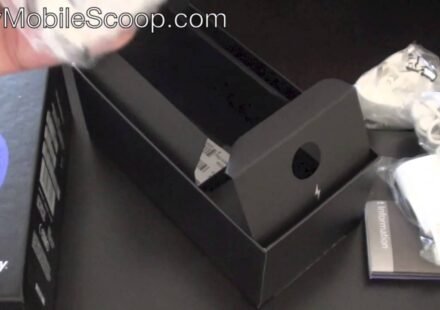
BlackBerry recently unveiled their latest flagship to the market. We were lucky to have a sample device and we’ve also done a sample unboxing if you missed it you can watch it here.
We’ve been very impressed with the phone. The design is cool, the operating system is very very fluid and works pretty smooth. I was once a hater of Blackberry thinking they weren’t cool enough, now I can’t stop using this Z10. Blackberry has added an 8MP camera to the Z10. You already know about the camera features like Time-shift etc. But what about the clarity ? Well, we’ve put it to test and we came up with this.
[nggallery id=21]
We were also curious about the video quality of the camera, so we went ahead and shot a video as well. Make sure you switch to HD mode when you start viewing the video.
Liked what you saw ? Let us know in the comments section.