
Sony has been making headlines with their latest series of Xperia devices. The new Xperia Z and Xperia Z Ultra has been one of the user favourite devices. Both device have stunning design and eye catching features like water and dust resistance. The Xperia Tablet Z is no exception. With its unique crafted omni-balance design, its one of the irresistible Android tablets in the market. And the company has also succeeded in making it water and dust resistant. Yes you can take it to the pool or tub !!
Xperia Tablet Z was announced a few months back at Mobile World Congress held at Barcelona this year. And you must have seen our coverage on the blog. This 10.1 inch LTE capable tablet is also the thinnest tablet in the market at just 6.9mm and weighs only 495g. The tablet has a really eye catching design. Just as they mentioned in the ad, the tablet really blends to its surroundings. The highly reflective screen just blends to the environment around it and one can’t deny that it is a very fashionable device. The tablet in portrait orientation may look a little taller than other conventional tablets. Personally, I haven’t been a fan of this awfully long design. But it did become quite useful while reading long articles on certain websites and Instapaper. Holding the tablet Z is quite comfrotable in hands. The weight is very negligible and the thickness is way less that it feels smooth and comfortable in hands. A lot of friends and family who saw this device really fell in love with simple thin design of the Tablet Z. Most of them also agreed that it has a better design than the iPad. People particularly appreciated the even distribution of the thickness throughout the design against the iPad which has a curved back. Check out the photos below.
The tablet’s display is powered by the Sony Mobile Bravia Engine 2 which gives one of the best in class display in the market. The display is one of the best features of Tablet Z that makes it stand out from the crowd. Photos and videos look stuninng on the display. I copied several videos on to the tablet Z and found them really mind blowing on the display. The colour production is so great and vivid. The display also stood up very well against outdoor usage or in environments with more light sources. Moreover, you already know how stunning the Bravia display looks on the Sony TVs and now its on your tablet too as Mobile Bravia Engine 2. The high resolution screen also displays the websites perfectly and text looks very sharp and crisp. If you’ve liked the retina display on the iPad, then you’re gonna love this one. Book lovers will also love the tablet as the tablet offers great reading experience. Kindle and Google Play books are a must have on this tablet. The surrounding bezel on the screen is little too wide. It would’ve been more eye catching if it had thinner bezel as thinner bezels make the screen look bigger. But that’s in no way a turn off for a potential customer. Its just one of the things we like to see improved in the next version hopefully. Towards the top left of the bezel, you’ll notice the Sony branding and towards the centre you’ll find the front facing camera which is 2MP. Even though the device looks all elegant and premium, its still designed to survive tough conditions. Lets recall our worst nightmares for a device. Say spilling water over it or dropping it to the pool Or even lots of dust over it. Well, the tablet Z can withstand all these without any trouble. It has IP55 & IP57 certifications which makes it water and dust resistant. It can stay underwater for 30 minutes up to a depth of 1.5 metres. So next time you drop your tablet in the tub or pool, remember to dive and swim with it. And for this very reason, the device has a completely sealed design. i.e. all ports are to be covered when not in use. There are plastic caps that should be placed on ports when not in use. And these caps are not detachable from the tablet either. It can be a little annoying for having to remove these caps each time from the ports when you want to connect them to the charger or earphones.
The left hand side of the Tablet Z houses the 3.5mm headphone jack, stylish power button, charging dock connector, notification light and the single piece volume button. The design of the power button itself tells how much the company wanted this device to a fashion statement as well. And yes, as mentioned above, the headphone jack also has the plastic cover which can be used to cover the port when not in use protecting it from water and dust. The charging connector ports are only useful if you have a dock as it auto charges the device without the need of a separate cable. Below is the picture of the tablet Z being charged via the dock connector. The single piece volume button is decently long enough. Usually, the designers put smaller volume adjusters that you confront with some difficulties while adjusting volume without actually looking. Say, while watching a video and you don’t want to take your eyes off.
The notification led has different colours to indicate different situation like a dark red for low battery, green for full charge and white for awaiting notifications. The needle sized notification led does light very brightly grabbing quick attention. Trust me, you won’t go to bed without getting that light to turn off. And the last item on the left hand side of the tablet is the speaker. There’s one on the other side as well. Speakers are very loud and you can adjust the sound output by fiddling with the equaliser settings. Since speakers are on two different sides, you’ll always hear alerts and sounds even if one of the speaker is covered due to the position you’re holding the tablet. It’s surprising to see so many ports on such a very thin device. The amount of engineering that has gone to this device is amazing. The engineers behind tablet Z has been very kind that they’ve installed some high quality high performing hardware to keep the tablet working smoothly. The 1.7Ghz Quad core Qualcomm Snapdragon S4 processor will ensure all your tablet apps are running fine and smooth with the aid of the 1GB RAM that comes in it. The Adreno 320 GPU will also ensure that gaming and other graphics intensive apps run smoothly giving you the best experience. We tried playing the Real Racing 3 game on iOS. The graphics was not the finest and there were some stuttering as well. But many other games with less graphics performed just fine. I’ve previously reviewed and used many Android tablets. What frustrated me with them was the intermittent stuck screen and unresponsive menus. Sometimes the device would just stop performing or accepting any inputs as its still stuck in the last operation. Luckily, I encountered none of that with the Xperia Tablet Z. The hardware really keeps up and performs smoothly. We also loaded plenty of apps and media to the tablet that it was almost full. However, the tablet showed no sign of slowing down or any delay in loading any selected item.
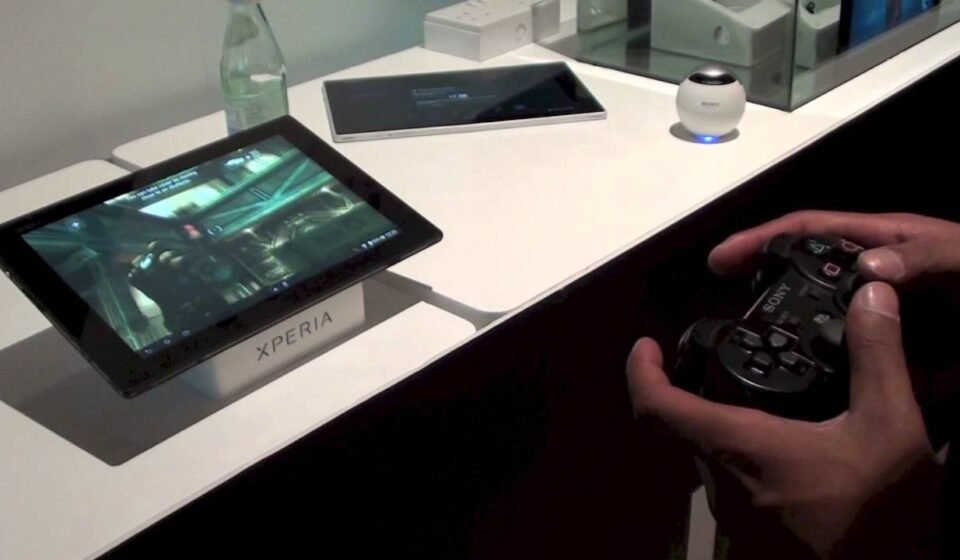
Some interesting things to note about Tablet Z when it comes to gaming is that the device supports Playstation controllers. i.e. you can play games with it. So if you’re a frequent PlayStation gamer, this should give you same or similar performance. Not to mention the convenience of not having to hold something as big as a tablet up close. Controls were smoothly. I didn’t face any issues with it. The gameplay went smooth as it should be.
And for those who wish to go a little tough on their tablet, the will come in handy as they indicate that the tablet is water and dust resistant. You heard that right. The tablet can stay under water up to 30 minutes up to a depth of 1.5m. These features are getting a lot of attention these days. Life is getting busier by the day and we can’t always be very cautious about our devices. Sometimes we spill some water or wine over phone or tablet. Or our little ones give the device a lovely bath in the tub or pool. And that’s one of the most tragic thing to happen as these devices carry almost everything that’s important to us in it. All our emails, files, photos, videos, apps and what not. Losing them can’t be a nightmare. And setting them back on a new device from your back up or the cloud isn’t that easy either. But all that’s not a worry on the Sony’s Tablet Z. I gotta say it, I wasn’t really excited about this feature first, but now I realise how much it means to me as I recently had a device that got damaged and lost everything. And I’ve decided that my next purchase will definitely have water and dust proof features in top priority.
The tablet runs Android Jelly Bean 4.1 with additional Sony exclusive services. Sony has also incorporated an infrared sensor to the device that lets you use your tablet as tv or dvr or home theatre remote. The tablet can also store over 7-8 configurations of several devices you wish to control with it. If you think that’s awesome, then you will surprised to hear about the NFC capabilities of the device. Anything that you’re currently viewing on the tablet can be instantly streamed on to your supported tv just by tapping the NFC capable remote on to the tablet. The camera quality is decent with the 8.1MP camera at the back and 2MP camera on the front.
I really enjoyed my time with Xperia Tablet Z. It has very good battery life, amazing display, great fashionable overall design, additional eye catching features like water and dust resistance, plethora of Sony exclusive apps and above all, the timescale UI is really beautiful and stylish. if I were in the market for an Android tablet, I would definitely pick this one without any second thoughts. And I think you should too.