Nokia Nuron: For The Cash Strapped Geek

The Nokia 5230, codenamed “The Nuron”, is among the first of the Nokia phones that marked the ‘smartphone for masses’ kind of portfolio the company is following lately. Put simply, the Nuron is a touchscreen 3G smartphone, with many additional functionalities like A-GPS and a built-in accelerometer thrown in, marketed at a very very […]

Excerpt only. No capture of this post’s full text survives in the Internet Archive; what appears above is the teaser its index page carried. Check every archived capture of this URL.

Google Services Now Optimized for iPad and Other Tablet Computers

While surfing the web on your iPad, we expect many of you will want to check your Gmail. If you go to gmail.com in your browser, you’ll see something different than what you’re used to on the desktop. We’re releasing an experimental user interface for the iPad built on the Gmail for mobile HTML5 web app that we launched last year for the iPhone and Android devices. Those devices have large screens compared to other phones, and tablets like the iPad give us even more room to innovate. To take advantage of the iPad’s large display, we’ve created a two-pane view with your list of conversations on the left and messages to the right.

gmail ipad

To try this new interface, go to gmail.com in your browser. We recommend adding a homescreen link for easy access. As this interface is experimental, expect changes as we continue to develop and optimize. Also, please let us know any ideas or feedback that you have. You can also access Gmail on the iPad through the native Mail app using the IMAP protocol.

Additionally, the iPad ships with a number of Google services pre-installed. As with Mac computers and the iPhone, you’ll find Google Search in the top right corner of Safari. The YouTube app for iPad is built-in, so you can watch HD videos and read and write comments. The new Maps app on iPad takes advantage of high-resolution satellite and Street View imagery, includes a new terrain view, and lets you search for local businesses and get directions. Just like on the iPhone, you can also go to the App Store to download Google Mobile App with search by voice. Of course, Google Mobile App was originally designed for the iPhone’s screen dimensions, but we’ve adapted it to work on the iPad and we’re looking into new ideas to make the app even better.

As you use Google’s web-based applications on iPad, you’ll notice that you sometimes see the desktop user interface and other times you see the mobile interface. We’ve evaluated the behavior of each Google web app using the iPad Simulator, and we are serving the interface we feel works best. If you’d like any help using our products on iPad, please click the ‘Help’ link within the product.

VN:F [1.8.7_1070]
Rating: 10.0/10 (1 vote cast)
VN:F [1.8.7_1070]
Rating: 0 (from 0 votes)

Google Services Now Optimized for iPad and Other Tablet Computers10.0101
If you enjoyed this post, make sure you subscribe to my RSS feed!

Related posts:

  1. Google Nexus One: Specificationss and Details The Google Phone has been officially revealed. After weeks…
  2. Get The iPad Experience Before Buying One If you are not living on another planet, you probably…
  3. Microsoft joins with yahoo for search engine services MIcrosoft had finally decided to join hands with yahoo…
  4. Google Maps 4.0 for BlackBerry adds Search by Voice, Google Buzz, Starring, Labs, and More Google Maps version 4.0 is the first ever update in…
  5. Pre-Order Your Apple iPad Now A magical and revolutionary product at an unbelievable price….

Related posts brought to you by Yet Another Related Posts Plugin.

Nokia: Beyond Building Hardwares

Nokia has been focussing on software industry for a while now. Apart from simply releasing new phones to market, they have also started making softwares that would make your experience on these phones better. Understanding the present day needs of the user, Nokia has released softwares that users have been dying to find out. And yeah, this includes an HTML email client, a social networking app for twitter and facebook and more. Nokia also has some rare softwares which you might never find in other manufactures like the Nokia Point and Find, Nokia Gig Finder, Nokia Indoor Navigation for Shoping malls(Nokia Kamppi) etc. We have picked three must have apps on any Nokia phone.

Now what does this matter to a user ?? We know we have some apps available that can do some of these tasks very well. But let’s not forget that these are not free. Even some Nokia apps are not free, but they are seriously cheap and yeah if you face some problem you get quick support from Nokia through Email and Twitter. I think the @NokiaMessaging needs a special mention here. Folks at Nokia Messaging quickly respond to your problems and fixes any problem as fast as they can. You know we get annoyed only when something wrong happens and there is no one to take care of it.

1. Nokia Messaging

To those who are new to Nokia Messaging, it’s an HTML supported email program that fetches your emails from services like Google, Yahoo and more to your phone. They support a wide variety of email service providers and Google Apps and Yahoo Small Business. Also they currently support more than 10 s60 phones with over 20+ languages support. The services is free in most countries but in some places you might have to pay a meagre amount to avail the service. For more details on this service, Click Here

2. Nokia Messaging for Social Networks

Everybody has a social life online and most of us just can’t stay out of it. Nokia understands this truth very well. That’s why they have solution for it too. Nokia Messaging for Social Netwoking which is in beta is another service from Nokia that lets you manage your social life online on the go.

With support for twitter and facebook, the app lets you post tweets with location, view yours or profile of those who you are following, send direct messages, mark tweets as favorite and more. Similarly you can update facebook status, upload videos and photos, accept invitation and add it to calendar, Click to Call/text/FB-Email and more. The app also pushes updates to homescreen which is very handy. All-in-all a good app with a few bugs. But its free and in Beta. So it will get better. Get your copy here

3. Ovi Maps Navigation


A while ago, Nokia announced that all their navigation as free which has really kicked the navigation market to the nest level. With this announcement from Nokia, many of my friends(Nokia fan boys) has gone crazy and has downloaded the service while a few switched to new phones as the service wasn’t compatible with their old Nokia phone. Nokia Ovi maps Navigation provides free Voice guided both walk and drive navigation with support for Lonely Planet and Michelin guides. The service has maps of over 70 countries. Nokia is adding as many device as possible to the device list. You can check the list of currently supported devices here.

These are some of the many and best Nokia apps available which we have introduced based on user interest. There are still plenty of apps available that might interest you which you can check out by going here.

Nokia Recycler Program

And just in case if you didn’t know, Nokia takes care of your device even when you are done using it. The Nokia Mobile recycling program collects your old mobile and recycles it saving our mother Earth from e-waste. Be a part of this great venture by leaving your phones at Nokia Showrooms for recycling when you switch to a new device.

Liked it ? Star us below or leave a comment.

BSNL 3G Guide: For Kerala Customers

BSNL launched 3G services in Kerala back in January. The service was first launched in Kozhikode, Kannur and Wayanad and BSNL gradually expanded services to Thiruvananthapuram, Kottayam etc. The most surprising fact is that Ernakulam being the most modern city of the state still haven’t started 3G services which has been a let down for many users.

We contacted the officials of Ernakulam but they were unable to comment on when the service would start. But the good news is that Ernakulam district has got 150 spots 3G enabled. They also said that eventually all the towers will be converted from 2/2.5G to 3G.

If you are impatient like me and if you want to use the service, here is an easy way. Try to get a sim from any of the cities where 3G services have already been launched. It doesn’t matter even if its a 2G sim. You can convert it to 3G by the following steps:-

For PREPAID users:

Step 1: Send an SMS to 53733 typing M3G120

Step 2: You will receive confirmation in minutes and send a SMS to 53733 by typing M3G120y

In a few minutes you will be converted to 3G. Please note call rates and sms tariff are different in 3G, so you may wanna take a look at here. Click Here There isn’t any need for any minimum balance to do the conversion. And any balance in your phone will be available even after conversion :-)

For POSTPAID users:

Postpaid user need to fill in an application form available online. But some officials said thats not necessary. Well, its BSNL. Anyway there is an Online Registration Form. You may fill out that. Click Here

Read the frequently asked question to clarify any further doubts. Go here and click FAQ

Once you are converted to 3G, you will require a minimum balance of Rs50 to use the internet according to customer care. But yeah, our testing found out that you can use even when your balance is below Rs50.
The following settings are to be entered to get access to internet.

Access Point: bsnlsouth.cellone.in
Username: 10 Digit Mobile Number
Password: 10 Digit Mobile Number

And here is a tip for Nokia Users, if you want to stay on 3G tower all the time preventing your phone automatically switching to 2G towers, then go to MENU>SETTINGS>CONNECTIVITY>NETWORK>NETWORK MODE and choose UMTS.

So what are you waiting for ? Go enjoy 3g service today. Or already using 3G ?? Tell us your thoughts in the comment section.
UPDATE: Download the 3G locations list here

No related posts.

Related posts brought to you by Yet Another Related Posts Plugin.

The Nokia N97 Review

Nokia has made several Nseries device which had really shaken the market like the N73, N70 and of course the N95. N95 has been titled as one of the best phones Nokia has ever made. And we all agree with that. It’s true that since then we havent seen such a groundbreaking device then until Nokia released the N97. One of the highly anticipated device has been in the market for a while now. The N97 has bought for the first time a touchscreen and QWERTY keyboard combo for the first time in the Nokia stream of phones.

If that’s not just enough for you, then see if a Carl Zeiss 5MP camera with 30fps video recording or a life time NAVIGATION with voice for both Walk and Drive or a massive 32GB internal storage with extra room for a 16gb micro sd card can please you. These are just the highlights. Obviously, you will also see A-GPS, WLAN, BT, 3.5″ nHD screen and 3G HSDPA connectivity. There is nothing more you can ask on this device’s hardware.

And yeah, for the software side, N97 is powered with Symbian S60V5 OS. The s60v5 version is specifically designed for touchscreen phones and yeah Symbian unlike the iPhone OS is a multitasking beast. If you have already used symbian, then you will not find much differences with this version of OS except for larger buttons and slight tweaks. But on the N97 you will see some more changes which you might not see on any other S60v5 phones like the Widget HomeScreen. N97 is capable of having widgets on the homescreen which updates itself automatically to keep you in sync with the web. Widgets include those for mail, stocks, weather, facebook, twitter and more. You can see them all at one place.

All you need is wifi or data connection and the phone does the rest. You may also notice that, apart from the internet widgets you also have access to other widgets which lets you access the clock, calendar, change profile, access four main apps via shortcuts or even your four main contacts with full conversation history. Isn’t that amazing to do all this without even having to jump on to the menu ??? And yeah, if you wanna break from all these widgets with numbers and stuff, you can easily switch to basic homescreen which just shows you clock, calendar and the lovely wallpaper you have. Check out the demo below.

From the HomeScreen, you can get on to the menu through the beautifully placed, slightly tilted silver menu button(image below). The menu icons looks the same as other s60 phones. You also have the option here to rearrange the menu icons so that you can have your frequently used apps’ icon on top which will save you some time scrolling down.

Talking about scrolling, the N97 comes with fully integrated Kinetic Scrolling(FW v2.0 or higher). If this word is new to you, then you might wanna check out the video below. Some call this flick scrolling while some call it iPhone like scrolling. What makes this scrolling special is that it helps you to scroll up and down with just the flick of a finger for which earlier you had to drag the tiny slider on the right side of the menu. Iam sure it was a nightmare for those with fat fingers.

Calling and texting are simple as anything. Just tap on the dialer button on the homescreen, enter your number and Whoa ! Alternatively, you can choose a contact from contacts menu on the homescreen. However, one drawback we’ve seen is that the dialer pad does not have alphabets on it which can be little trouble if you wanna dial say 1800-400-SACHU 😉

As mentioned earlier, since symbian OS can multitask, you can access other apps on your phone while in a call. You can send sms, email, read tweets or continue browsing uaescoop.com 😉 In addition, you can conference call, hold or mute which are pretty much the basic stuffs.

Texting and MMS are also just as easy. You just have to enter the messaging menu and tap on write message. If you are a power texter, you can have homescreen shortcut which on tapping opens you the write message page directly. This is very handy when you are extremely busy.

This is the first menu that welcomes you when you tap on the messaging app. The first option is to write a message in text format. The writing page also contains the option to add media contents which when added converts the message to a multimedia text message. Inbox being the second in row has all your incoming messages. The messaging app has an email client built in. But we are not going to use it as it doesn’t support HTML. After all why should we use it when we have the popular Nokia Messaging app which we shall cover later. You can also view your sent messages and also you can keep track of messages you have sent if you are in a strict messaging plan. One great is that the ability to receive delivery reports. For Nokia users, its not great thing. But do you know iPhone doesn’t support it yet officially. The QWERTY keyboard can keep up with your typing speeds and is very easy to type. It’s very handy as typing on the touchscreen wont work all the time in all situations. So if you are one of those who sends large emails and texts this is the right device for you.

Tired of reading ?? Take a break and enjoy the video below:

Nseries device are famous for their multimedia capabilities and N97 is no exception. N97 performs way higher than user expectations. The gorgeous nHD 3.5″ display, the 32GB onboard memory, 5MP Camera, powerful speakers all add to the experience. Its almost a computer and you never have to delete any item. If you still find that space isn’t enough for you, don’t forget the additional 16GB card support which will bring up the total storage on the device upto a whopping 48GB.

Flipping through photos, music and videos are just a breeze. Almost all types of audio and images are supported on the device. You can also watch unlimited youtube videos through the dedicated client(Requires data connection). But we didn’t like about the gallery is browsing through them. Kinetic scrolling does help navigate easily, but the photos and videos are all mixed up. Though you have an option to sort it out, we would like the menu for it on the main page of gallery directly rather than going to options everytime. However you will notice some wisely placed touch buttons for sending, editing or even trashing.

Music player is really awesome. It really makes use of the 3.5″ display. All your songs just look as sweet as they sound with that gorgeous album art. And yeah, you can manually set it too which means it could be your picture under Britney’s song 😉
The UI is normal s60 looking but redesigned for touch access. You can also have a small music widget on Home Screen so that you can see which track is being played and a tap on it will take you to the Music Player.

Camera is another stunning feature of the N97. And yeah, its one of the 5mp camera phones I have tested. Videos also look great. But both fails to deliver high quality images or videos in low light. Thanks to the LED flash in the phone:-P There are a variety of option the camera gives you before you can start snapping/recording.

Web Browsing is a great experience on the N97. The big screen does really add to the browsing experience. One great feature of the browser is that it auto hides the address bar, navigation and the status bar when a page completes loading so that u can simply start panning or zooming around the page. The browser also supports flash unlike many other great browsers out there. You can have personalized bookmarks, username/password storage etc are all out of the box. Pages loaded faster and looked stunning. The always accessible Zoom button is a blessing. But sometimes zooming with it is too difficult.

is another awesome feature. Again the big 3.5″ display makes it a great device for navigation. So you can easily mount them in your car easily and you can intermittently look at the phone screen and road while driving. As mentioned, since its a big screen you dont have to strain yourself on to the screen while driving to know where you are which might cause some accidents. Recently, Ovi announced free Voice guided Navigation to make navigation easier and fun. The following services are provided by Ovi.

Free Drive navigation
Free Walk navigation
Free maps and map updates
Free Events guides
Free Lonely Planet guides
Free Michelin guides

Applications are another blessing to this phone. To improve your touchscreen experience, developers have created plenty of fun, entertainment, utility apps etc. Not to mention Gravity for twitter, Nimbuzz etc are one of the best available. Sounds new? Don’t worry we have reviews coming up on them. Ovi store has almost all kinds of apps. So you will never walk out of the store without a new app in phone. Downloading apps are just as easy as tapping download button. The store client will do the rest. It will automatically download and install it to the phone. At the same time you can go about browsing another apps.

The only one question that arise in your mind would be, despite all these features, does the phone stay up all day long without requiring you to search for a charging outlet ?? Well, the answer is yes. There are many phones out there with plenty of features. But none of them has a battery that can keep up with all those features which is a great let down. Nokia has wisely placed a good battery to cater all your needs. So you can freely tweet, browse, listen to music or navigate without too much worry on the battery. Thanks Nokia ! Thumbs up for that because my battery life is very questionable on my iPhone 3GS :-(.

Nokia phones are a worthy investment these days. Great free services from Ovi for navigation, sharing, other softwares specifically designed by Nokia like Nokia Messaging, Point and Find, and many others makes it worth every penny. After all I’ve got to agree with the call quality on Nokia phones. Many companies have lost their focus these days. The primary use of a phone is to make calls and most phones today have call quality issues(dropped calls) even though they have many other features. But what good is a phone if it can’t make a proper call ??

The Bottom Line: N97 is a great multimedia/multitasking device. If you are one of those who like to stay connected 24/7 and share everything online then N97 has been designed just for you. This may not be the perfect device for the tech geeks as the phone is slightly slow when running large amount of apps. But this won’t be a problem to normal users as they may not have so many apps running at once.
The phone is really solid and feels great in your hands. And the sexy form factor will get all eyes on you(ok on your phone !) wherever you go 😉

Please let us know your opinions by commenting below.

Navigation: A Must Have App

So the fight between mobile phone manufactures have geared up very well now. Current scenario not only demands a great hardware from manufacturers but also a powerful software with a lot of integrated services. If you are thinking about HTML email support or a powerful web browser, then you are wrong. These have become a must have in mobile phones and are not specially demanded as they are expected to be available right out of the box.

What is rocking the market now is NAVIGATION. Not just navigation, but navigation with voice and turn by turn directions. Navigation of this sort was previously a premium service but now its coming built in or available as software update for most devices from almost all the manufacturers.

To start with, let’s go with Android who was the first to bring Navigation with voice and turn by turn directions in to the Motorola Droid through their firmware 2.1 update. Currently, Google’s Nexus One comes with this service pre-installed. Other Android powered device like HTC Hero is also expected to get this feature soon.

We all know how cool is Google Maps. The detailed view, street view, satellite view are all awesome and navigation is very smooth as well. Those who do not own an Android phone still can enjoy all the features except voice guided navigation and turn by turn directions through Google maps for Nokia phones which can be downloaded from google.com/maps through your phone’s web browser.

But why Navigate without voice and turn by turn directions when Nokia already provides a solution for it. And that too forever ! Nokia recently announced their Navigation Service as free for ever through “The Big Ovi Announcement Online Event”. Ovi maps provide you the following services.

Free Drive navigation
Free Walk navigation
Free maps and map updates
Free Events guides
Free Lonely Planet guides
Free Michelin guides

You can also choose from different languages for voice which is very helpful. The following devices are currently supported. Nokia X6 32GB, Nokia X6 16GB, Nokia N97 mini, Nokia N97, E72, E55, E52, Nokia 6730 classic, Nokia 6710 Navigator, Nokia 5800 Xpressmusic, Nokia 5800 Navigation Edition, Nokia 5230. More devices are being added.

Now the main players who are deprived of these services are Apple fan boys and the Windows Mobile Users.

Recent reports suggest that Windows Mobile 7 will come with free Navigation services but there are no strong evidences which indicates it. Google officials did say that they will release the same navigation app for iphone soon with all the services which Droid has. But no word has been heard on that after the release of Nexus One.

However, we have seen in November 09 a job listing from Apple calling iphone software engineers to develop a new map application. Apple said that they want to take maps to next level and asked to rethink how people used maps and found things. Apple also acquired the maps company Placebase which is a clear indication that there is maps app at work. But we are not sure when it will be available. Will it be introduced along with iPhone 4G or through the next software update ?

The Big Question is, which phone would you buy if Navigation is one of the primary feature you use. Comment below citing your reasons.

Nokia 5800 Video, Some start up tips

Well, after long phone calls and wait, nokia finally shipped me a new phone for the faulty old one. The new phone seems to be very responsive but it has the worst camera. My previous phone took great videos but now it takes video like a vga cam. Anyway, i dont want to run into nokia care again. Anyway, here are some start up tips that might be handy. More videos coming regarding apps and games.

Nokia E900: The Next Communicator

New Nokia Communicator has been announced. Its Nokia E7. Apparently its similar and in some case advanced than the device mentioned here.

Click this link to know all about the new communicator

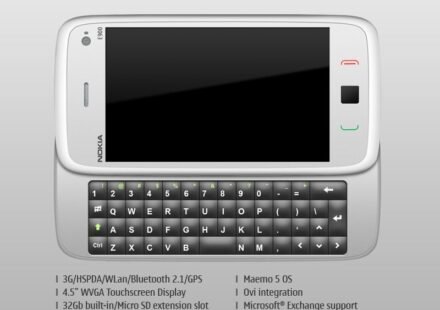
It’s been so long since the communicators saw a successor and here it is finally. Titled as the Nokia E900, its more similar to the nokia n900 in design and in specifications with some extra communicator only features. Check them out here.

e900The gorgeous 4.5″ display will be a great advantage to office users to work on their documents. The last installment of the communicator series had less width compared to its length. Inclusion of optical pad will also assist a lot in navigating through menus and files. And moreover it comes with Maemo, thanks to nokia for ditching the symbian in this. However, how much this device is gonna cost is a big question now. hope nokia prices it wisely. Now tell us if this was the communicator you’ve been waiting for ?? Or were you expecting something more ???

We also have some information on another eseries device in works, The nokia E97. Click here to read more.

Liked it ?? Star it and Share it 😉

Nokia N900 Vs Apple Iphone 3GS

Apple’s Iphone has been standing as the #1 for a pretty long time. Although the competing brands released a lot of competitors, none of them made to even stand close to the iphone. But now the competition is getting a little tight. All the companies are releasing their own flagship devices to destroy the monopoly of iphone at #1 position. So we thought it would be nice if we could compare the Mighty Iphone with the Nokia’s latest sensational device N900. So let’s take a round up. Here we go,

Round 1: Who’s got the Sexy ??

Cell phones are also considered as a fashion statement today. “Moreover the beauty of a thing liesin the eyes of the beholder” so we leave that to you ;-).

Round 2: Features

Iphone has got a 320 x 480 pixels, 3.5 inches touch screen display while nokia boasts of a whopping 800 x 480 pixels, 3.5 inches touch screen display. Now thats a display which you can’t stop starring at.

Nokia n900 also sports a full QWERTY physical keyboard which iphone does not. But that keeps iphone slimmer than the n900.

Both phones have 256 mb ram but iphone has got a fixed size storage of 16gb/32gb compared to n900 32gb internal+ upto 16gb card support. let’s not also not forget the virtual memory of n900 which brings a total of 1gb ram. Now that would be ideal for any power multitasker.

Talking about multitasking, iphone fails miserably here as it follows one app at a time style compared to n900.

Both the phones have Arm Cortex A8 processors which brings a tie. But when it comes to OS, we have no doubt that iphone 3gs is the clear winner with iphone os 3.0. But that would be too early to say. Let’s wait and see.

Coming to photo and video capabilities, n900 takes the lead with a 5mp camera with dual led flash over the iphone’s 3gs’ 3.2mp camera without flash. N900 again takes video in WVGA(848 x 480)@25fps while iphone records video in VGA @ 30fps. Camera and video samples are to be compared before we can take a decision. Hardware wise, n900 wins. Performance wise, ????

N900 also features a FM-transmitter  which is absent in iphone. TV-Out is possible in both but cable has to be purchased separately for iphone.

Apps are as important as any other feature. And you all know who tops here. Now we know maemo is a linux based os. So it has a large developer community and may be sometime they might become a competiton to App store.

Round 3: Connectivity

Iphone 3gs supports HSDPA upto 7.2mbps while N900 supports HSDPA upto 10mbps. Both phones have wifi, A-GPS, bluetooth and no infrared.

N900 also has radio which iphone lacks.

Round 4: Who is the Winner ????

We have seen in some rounds n900 took the lead while in some iphone. Now the question is which of these matters to you as everyone has their own taste and who is your winner ??

Jump up to the comment section to tell us your winner and why ???

Please note: Some features like price, mms, contract etc were not mentioned as these varies in many countries.